

With its industry-leading and unique feature set, Landmark offers creative solutions that enhance workflows and streamline everyday tasks, at the same time supporting your entire project from beginning to end. In addition to its creative interface and tools, Landmark supports both 2D and 3D workflows and ships with extensive libraries, templates and reports. Key features include:
PLANTING
Localised for Australia, you can place, label and quantify individual plants or groups, rows and areas of plants, mixed planting areas or even existing trees with powerful tools and associated libraries.
SITE MODELLING
Create and modify terrain models using an extensive range of tools, extract cut and fill information, place hardscapes, plants or mixed planting areas that automatically conform to the site model surface.
REPORTING
Report on any aspect of a project to quickly produce dynamic plant lists, volume, area or quantity take-offs, existing tree reports, drawing lists, etc, using Landmark's built-in spreadsheets. Import from or export to Excel while maintaining all formatting and layouts.
DATA MAPPING
Use any criteria such as size, area, elevation, usage, location, IFC data, etc, to change the graphical appearance of the drawing to better present concepts or to graphically represent data.
GIS
Enter a project address and a geolocated aerial image will appear in Vectorworks allowing contextual assessment, or use for planning. Alternatively, import high resolution georeferenced images, IFC or DWG files from external sources, that automatically go to their real-world coordinates.
3D MODELLING
When needing something unique that can't be found in one of the many libraries, utilise the extensive modelling toolset that extends from simple push pull operations to more complex sub-division or NURBS modelling.
IMPORT/EXPORT
No other program can match the comprehensive import and export abilities in Landmark. These include DWG/DXF/DWF, IFC, Revit®, SketchUp®, Rhino®, Shape, PDF and Parasolid®.
ARCHITECTURAL TOOLS
Create buildings or portions thereof using the extensive architectural toolset derived from Vectorworks Architect. These include walls, floors, roofs, stairs, doors and windows, with default content libraries for common Australian types.
3D RENDERING
Choose from a variety of render styles that include OpenGL (with or without shadows), hidden line, sketch, artistic and photorealistic. A huge library of predefined textures and entourage are there to choose from, or utilise an external real-time renderer such as Enscape, Lumion or Twinmotion.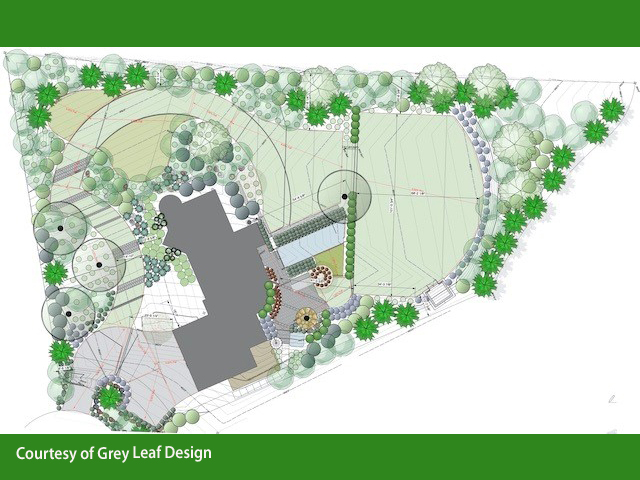
2D RENDERING
Enhance your 2D drawings with image fills, gradients, colours, drop shadows, tile fills or add a hand drawn look using the Sketch feature. Edit image attributes right inside the software while keeping both the original and modified image on hand.
IRRIGATION DESIGN
Design and analyse irrigation systems, prepare accurate as-built drawings, or calculate parameters like water pressure, flow rate, and velocity through the system components. Libraries for commonly used fixtures and fittings from companies like Toro, Rain Bird, Netafim, Irritrol and Hunter Industries are all included.
To find out more about transforming your workflows with Vectorworks Landmark click on the link below.